WHERE INCOME ADDITIONAL NOT SO EASY BUT REAL
I said it is not so easy, the reality is like that, not every blogs/websites is approved by Chitika, but real "It Is REAL", you can make DOLLAR provide by Chitika with some conditions.
One of additional income in to your Paypal, Payza Account is Chitika.
Of course with some conditions that applied by Chitika Admin. You can join in this valuable website as my referral, you can click this link.
Read the T.O.S (term of services) the conditional of your website/blog that can be approved by Chitika.
SOME CONDITIONS OF YOUR WEBSITE THAT MIGHT BE APPROVED BY CHITIKA ADMIN.
1. Your website/blog must be in ENGLISH.
2. Your website/blog's traffic is good, the more the better.
3. The content of your Website/Blog is not forbidden contents as pornogrphics/ adult, racism and other "dangerous" contents.
4. You join into Chitika become my referral or directly to the Chitika's website. To make more advantage to me I beg you to be my referral, without give you some disadvantages. win win solutions, I said.
5. Try to make your blog/website contents is unique and original plus attractive (on demand topic).
6. Page rank the higher the better.
7. Primary Domain will be better that secondary Domain website. But My Blog is secondary, sub by Blogger.com, If you wish the better please you the Primary Domain, for example: www.abc.com, www.abc.net, will be better than www.abc.blogspot.com, www.abc.co.cc etc.
FOLLOW THE RULE OF CHITIKA
The rules of Chitika must be obeyed. And you can chat to the administrator/Team Chitika or read T.O.S carefully. You can ask some help with chat or email to Chitika Team/Administrator.
HOPE YOU WILL TAKE THIS BENEFITS
Ok..! I just hope you will take this chance and make your website/blog as "source of additional" income provide and given by CHITIKA. Thank You.

Sunday, May 12, 2013


Sunday, April 21, 2013
TO MAKE WINDOWS XP, WINDOWS 7 OR WINDOWS 8 IN USB FLASH
BOOATBLE USB WINDOWS
I use Novicorp software that called "win to flash" still Beta version. Here the HCL (hard ware Compatibility List) from them :
--------------------------------------------------------------------------------------------

That's all, about Installing in to your PC you can choose FIRST BOOT is from USB/REMOVABLE USB...the steps are simple just like installing windows with CD/DVD.
Thanks.
DOWNLOAD BONUS
1. FUll Game House
2. Plant Tycoon
3. Chew WGA
I use Novicorp software that called "win to flash" still Beta version. Here the HCL (hard ware Compatibility List) from them :
--------------------------------------------------------------------------------------------
Hardware Compatibility List
Novicorp WinToFlash (x86)
10/30/2009
---------------------------
The Hardware
Compatibility List (HCL) contains products that have passed testing with
WinToFlash (x86). Not every computer and/or device has been tested in all
possible configurations. Visit the Novicorp WinToFlash Hardware Quality Labs
web site at http://go.novicorp.com/forwardlink/?linkid=13 for
the latest compatibility information.
Please Note:
The information contained in this document for each device is current as of the
date first posted; however, since these products are subject to modification,
revision or replacement by individual manufacturers at any time without notice,
Novicorp cannot guarantee their continued compatibility with our software.
--------------------------------------------------------------------------------------------
Motherboards
--------------------------------------------------------------------------------------------
ASUS
P5GC
P5GC-MX
Foxconn
P4M800P7MB-RS2H
Gigabyte
GA-965P-S3 (rev. 3.3)
--------------------------------------------------------------------------------------------
USB Flash sticks
--------------------------------------------------------------------------------------------
Kingstone
DTI/1GB
DTI3U/1GB
Transcend
JF V30/8GB
--------------------------------------------------------------------------------------------
Flash cards
--------------------------------------------------------------------------------------------
Silicon Power
Secure Digital Ultima II 1GB
Transcend
SD 1GB
SD 2GB
--------------------------------------------------------------------------------------------
Media devices
--------------------------------------------------------------------------------------------
Transcend
T.Sonc 520
--------------------------------------------------------------------------------------------
Card readers
--------------------------------------------------------------------------------------------
QbiQ
Myson CS8819A2-108
--------------------------------------------------------------------------------------------
Notebooks / Netbooks / Laptops
--------------------------------------------------------------------------------------------
Acer
Aspire One 150
Extensa 7630
IBM
ThinkPad R50e
---------------------------
End of document
--------------------------------------------------------------------------------------------
HOW TO MAKE USB BOOTABLE WITH WINDOWS XP (VISTA, 7 OR 8) INSIDE
With pictures that I will show you, it will be very simple steps to make it.
a. Preparation
1. Windows XP CD (I suggest you have the original one), and Windows Vista, 7 or 8 (DVD).
2. Usb Flash Drive as listed in HCL or if you want to try another it will be new experience.
For Windows XP at least 2GB capacity and for Windows Vista, 7 or 8 at least 8GB capacity
3. You PC/NOTEBOOK Operating system is available with CD/DVD ROM and so USB port(s).
4. Novicorp Windows to Flsah software version beta that I will give you the download link below.
5. Make sure that your PC/Notebook have Winrar or ZIP software, if you have not had it, please download Winrar here or here.
Note:
I beg your pardon if it will be hard to you, but I will make it simple for sure
I uploaded the link with adf.ly so you should " SKIP AD" (with yellow backdrop) on the right side UP of the paget, and the download link will appear, if need to login into www.4shared.com you must have it account, so register to them free, just with your e-mail, or to www.mediafire.com.
Note:
I beg your pardon if it will be hard to you, but I will make it simple for sure
I uploaded the link with adf.ly so you should " SKIP AD" (with yellow backdrop) on the right side UP of the paget, and the download link will appear, if need to login into www.4shared.com you must have it account, so register to them free, just with your e-mail, or to www.mediafire.com.
b. The Steps
2. Extract it in to your harddrive - no need to install just extract it at all.
3. Watch the pictures below
a. After extracted it click the application (file .exe) of win to flash will appear look like this...

b. Then picture 2
click NEXT

c. The picture 3

d. The picture 4

e. Picture 5

f. Picture 6 placing your CD/DVD Windows

g. Picture Placing your USB drive

h. Picture 8

i. Picture 9 Format USB if you have important data in you USB please back-up first.

j. Picture 10 Wait the process until FINISH


c. The picture 3

d. The picture 4

e. Picture 5

f. Picture 6 placing your CD/DVD Windows

g. Picture Placing your USB drive

h. Picture 8

i. Picture 9 Format USB if you have important data in you USB please back-up first.

j. Picture 10 Wait the process until FINISH

--------------------------------------------------------------------------------------------
--------------------------------------------------------------------------------------------
DOWNLOAD BONUS
1. FUll Game House
2. Plant Tycoon
3. Chew WGA
Thursday, April 18, 2013
MICROSOFT FRAME WORK 4 FAILED ON WIN 7 (HRESULT 0xc8000222)
MICROSOFT FRAME WORK (DOT NET) IS FAILED TO BE UPDATED
When you failed to install Dot Net (Microsoft Framework) version 4 on Windows 7. And lately appear error mesage like this "HRESULT 0xc8000222" ( this is the part windows automatic update services) In the otherhand we need this software to make some applications/software applications running well, how to fix this problem ?
WINDOWS AUTOMATIC UPDATE SERVICE
Updating Microsoft Framework sometimes blocked by Windows, and when it is happen we can fix this manually. Windows Automatic update service temporary must be stopped and RENAME ONE FOLDER in windows 7 called "SOFTWAREDISTRIBUTION" with "SDOLD". Then you start again Windows Automatic Update, and Install the MicrosoftFramework again.
STEPS TO INSTALL MICROSOFT FRAMEWORK THAT FAILED WITH ERROR MESSAGE HRESULT 0xc8000222There are some steps we can do (different between Win 7 and win XP but not significant)
and in my assumption you have had this software (.net/MS FrameWork)
1. Enter to "RUN" , the steps like this:
a. Start >> RUN (win XP)
b. Start >> Accessories >> RUN
c. Press Ctrl +ALT +DEL and choose TASK MANAGER (in Win 7) and click File >> NEW TASK (RUN)
 2. In the BOX you type "CMD" (without quote).
3. And "command prompt" will appear (under dos)
4. Type "CD\" (without quote) and Press ENTER
 5. And become C prompt (C\>:) and type "net stop WuAuServ" (without quote) and press ENTER
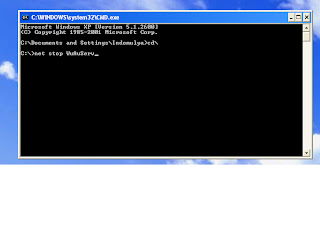 6. Return to step 1 (enter to the RUN box) and in the box type "%windir%" (without quote), find folder named "SOFTWAREDISTRIBUTION" and RIGHT CLICK it and RENAME with "SDOld" (without quote).


7. Return to step 2 (in the RUN box type CMD) and until step 5 (become C Prompt) you can type "net start WuAuServ" (without quote)

8. Re install the Microsoft FrameWork version 4 on Win 7. .
What's wrong with the Quick Menu In Canon Mp237 Printer if it didn't work ?
The feature of this printer is complete for household user, there are scanner, copier and so printer. With a small dimension of it. I will not talk about this printer, but One of the software feature of this printer, QUICK MENU. And the problem of disappearing QUICK MENU is DOT NET (microsoft frame work version 4 or higher) cannot be installed well. With quick menu will make possible to run Multiple Page scanning (scan gear), with the steps above, you will fully install Quick Menu in this MP237 Canon All-In-One Printer, and you can use multipage scanning application on it. Good Luck
DOWNLOAD BONUS
1. REGISTER ADSENSE CAMP LINK
2. REGISTER CHITIKA LINK
When you failed to install Dot Net (Microsoft Framework) version 4 on Windows 7. And lately appear error mesage like this "HRESULT 0xc8000222" ( this is the part windows automatic update services) In the otherhand we need this software to make some applications/software applications running well, how to fix this problem ?
WINDOWS AUTOMATIC UPDATE SERVICE
Updating Microsoft Framework sometimes blocked by Windows, and when it is happen we can fix this manually. Windows Automatic update service temporary must be stopped and RENAME ONE FOLDER in windows 7 called "SOFTWAREDISTRIBUTION" with "SDOLD". Then you start again Windows Automatic Update, and Install the MicrosoftFramework again.
STEPS TO INSTALL MICROSOFT FRAMEWORK THAT FAILED WITH ERROR MESSAGE HRESULT 0xc8000222There are some steps we can do (different between Win 7 and win XP but not significant)
and in my assumption you have had this software (.net/MS FrameWork)
1. Enter to "RUN" , the steps like this:
a. Start >> RUN (win XP)
b. Start >> Accessories >> RUN
c. Press Ctrl +ALT +DEL and choose TASK MANAGER (in Win 7) and click File >> NEW TASK (RUN)

3. And "command prompt" will appear (under dos)
4. Type "CD\" (without quote) and Press ENTER
(COMMAND PROMPT/C PROMPT)

(NET STOP WUAUSERV)

(%WINDIR%)

(SOFTWAREDISTRIBUTION FOLDER)

(RENAME SOFTWAREDISTRIBUTION FOLDER WITH SDOLD)

7. Return to step 2 (in the RUN box type CMD) and until step 5 (become C Prompt) you can type "net start WuAuServ" (without quote)
(NET START WUAUSERV)

8. Re install the Microsoft FrameWork version 4 on Win 7. .
What's wrong with the Quick Menu In Canon Mp237 Printer if it didn't work ?
The feature of this printer is complete for household user, there are scanner, copier and so printer. With a small dimension of it. I will not talk about this printer, but One of the software feature of this printer, QUICK MENU. And the problem of disappearing QUICK MENU is DOT NET (microsoft frame work version 4 or higher) cannot be installed well. With quick menu will make possible to run Multiple Page scanning (scan gear), with the steps above, you will fully install Quick Menu in this MP237 Canon All-In-One Printer, and you can use multipage scanning application on it. Good Luck
DOWNLOAD BONUS
1. REGISTER ADSENSE CAMP LINK
2. REGISTER CHITIKA LINK
Thursday, March 14, 2013
MAKE PARTITION ON WINDOWS XP, WIN 7 AND WIN 8
BUILT-UP INSTALLATION DOESN’T HAVE MORE THAN ONE PARTITIONS
When we purchase PC or Notebook with original Operating System that has been installed usually only one partition as Operating System Drive. How to devide it into more than one partitions ? You can use software Partition Magic for XP with version 7 or 8 but Windows 7 or Windows 8 with version 10 or above. With this software (partition magic) sometimes will not works (especially in Windows XP) and if this happened you can not make any partitions in your computer/PC with this built-up windows software. If you want to have more than one partition you can reinstall it with a New Windows CD original, that you must buy again.
WHEN INSTALL WINDOWS XP
You can make partition when you first install Windows XP, Boot from CD/DVD ROM, after enter, and hit F8 the computer will searching previous system (if there is one installed before). But first install will found UNALLOCATED/UNFORMATTED harddisk. By press C (create) yaou can create the partition you wanted. Press enter to fix it, and other partition is unallocated, you can make other partition by pressing C to spesified capacity of partition or just enter to make partition with left capacity of your harddisk. Ok! the patition of you harddisk is devide into OPERATING SYSTEMS (C drive usually) and DATA drive.
WINDOWS 7 AND WINDOWS 8
Without Partition Magic software you can SHRING or EXTEND you harddrive that have not been partitioned (only operating system and system reserved 100Mb).
You just follow this steps :
1. Click on Start (Windows 8 on Desktop folder)
2. Find “Computer”, And right click it.
3. You will see “Manage”, click on it
4. The you can click “DISK MANAGEMENT”
5. Point to your partition of your harddisk, you can read it (system with its capacity). And then Right Click on it
6. Scroll bar will appear, and one of them “SHRINK”….
7. Be carefull with this step,…..
8. Make the capacity on your harddrive RIGHT (not to small), you can watch the capacity will be (after shrink).
9. You can TYPE the capacity or use scroll arrow (up or down, but it will take longer times…).
10. Make sure that your SHRINKING is excatly right no mistakes.
11. And click SHRINK and OK… you have new partition.
Thanks
DOWNLOADS BONUS
1. Anti mosquitoes Software
2. Watcher Wireless
3. Get My Ip
4. Your Un-Installer Pro
5. Visual Boy Harvestmoon Game
Monday, February 25, 2013
Want An USB DRIVE Application Similar To U3 Smart ?
U3 Is Trade Mark From Sandisk
Only certain Usb type that can be installed by U3 Smart, you will recognize it with its logo (on the body). U3 is may be a special edition in December 2009 ago,so if you purchase the USB Drive with brand Sandisk (Cruzer, Cruzer Blade, etc)they will not suitable/available U3 support. And if you have the Usb Sandisk with U3 Smart will be a good news, may be they are rare thing, take care of it.
What Do You Do If You Want To Install Software Similar To U3 Smart ?
I will share it, how to get one with common Usb Drive (every Usb Drive). Some Open Source Program Called Portable Applications, a.k.a PortableApps, will be one of the answers. Open Source that mean Free From Charge. You just have to have Internet Connection to Download the Installer and to download some applications that automatically installed to your Usb Drive. Here the link.Www.portableApps.com, the size is relatively small, only 3,2Mb, and it is very simple installation.
How To Install ?
Before Installation make sure your system is connected to the Internet (on line). Double Click on PortableApps.exe Platform Setup...(and will appear RUN) click on it. Direct the installation to your USB drive (depend on where the Usb Drive is detect by you computer, example: Drive F:, Drive E:, and so on)by click BROWSE box,... and click OK. And wait untill finish,....and it will directly detect to portable application website,... you can choose (by checking it in the box)the application you want to install to your Usb Drive. It will be automatically installed after download is done. Now you can make password on your USB drive, you can eject it, you can make the colour of application by setting it, etc.... Thanks a lot.
Only certain Usb type that can be installed by U3 Smart, you will recognize it with its logo (on the body). U3 is may be a special edition in December 2009 ago,so if you purchase the USB Drive with brand Sandisk (Cruzer, Cruzer Blade, etc)they will not suitable/available U3 support. And if you have the Usb Sandisk with U3 Smart will be a good news, may be they are rare thing, take care of it.
What Do You Do If You Want To Install Software Similar To U3 Smart ?
I will share it, how to get one with common Usb Drive (every Usb Drive). Some Open Source Program Called Portable Applications, a.k.a PortableApps, will be one of the answers. Open Source that mean Free From Charge. You just have to have Internet Connection to Download the Installer and to download some applications that automatically installed to your Usb Drive. Here the link.Www.portableApps.com, the size is relatively small, only 3,2Mb, and it is very simple installation.
How To Install ?
Before Installation make sure your system is connected to the Internet (on line). Double Click on PortableApps.exe Platform Setup...(and will appear RUN) click on it. Direct the installation to your USB drive (depend on where the Usb Drive is detect by you computer, example: Drive F:, Drive E:, and so on)by click BROWSE box,... and click OK. And wait untill finish,....and it will directly detect to portable application website,... you can choose (by checking it in the box)the application you want to install to your Usb Drive. It will be automatically installed after download is done. Now you can make password on your USB drive, you can eject it, you can make the colour of application by setting it, etc.... Thanks a lot.
Saturday, September 15, 2012
TO PROTECT YOUR WIFI
Wifi Settings
When you have wifi access point (hot spot), with certainly range - e.g: 50ms, 100ms or more), had been running, of course with internet conncetion included, one thing is necessary to you.
Protection of your internet conncetion in order to make your internet conncetion safe.
What protection do you want to use ?
1. With password (ASCII, AES-TKIP, WEP,etc..)
2. With IP Address (You can use certain number as :192.168.xx.xx) combination with DNS/Alternating DNS
3. With Mac Address
4. Combination
Cracker and Hacker Alway manace our wifi
With protection I mentioned, not guarantee our wifi will free from problems that come from cracker and hacker around our wifi, so with the safest protection (combination), will make the manaces be minimized.
Softwares Maybe You Must Know
There is relation with wifi,....
1. Netcut
2. Netcat
3. Anti ARP
4. Wifi Key Finder etc...
Thanks
When you have wifi access point (hot spot), with certainly range - e.g: 50ms, 100ms or more), had been running, of course with internet conncetion included, one thing is necessary to you.
Protection of your internet conncetion in order to make your internet conncetion safe.
What protection do you want to use ?
1. With password (ASCII, AES-TKIP, WEP,etc..)
2. With IP Address (You can use certain number as :192.168.xx.xx) combination with DNS/Alternating DNS
3. With Mac Address
4. Combination
Cracker and Hacker Alway manace our wifi
With protection I mentioned, not guarantee our wifi will free from problems that come from cracker and hacker around our wifi, so with the safest protection (combination), will make the manaces be minimized.
Softwares Maybe You Must Know
There is relation with wifi,....
1. Netcut
2. Netcat
3. Anti ARP
4. Wifi Key Finder etc...
Thanks
Sunday, May 27, 2012
BACKING-UP OUR DATA
BACKING-UP OUR DATA
The datas of your computers are very
important, maybe more important than computer itself. Yes, work’s data, old important data, proposal data, confidential
data and so on. One word is that true,
DATA is very important. But loosing data is usually happened, so to prevent in
loosing data you must have data BACK-UP. It is wise to make one or more data
back-up, to make sure your all (important) data is not lost (without back-up).
Where You will store your data ?
In other word how and where to
back-up our data.
Generally we have three data storages.
Dynamic data storage and static data storage, and now days we have online data
storages that provided by server/cloud data storages. We called cloud data
storages or server data storages.
Backing-up Your data.
1.Static data storage, e.g :CD -r,
DVD-r, CD-rw, DVD-rw, you will back-up
safer with static data storage, and with read only static data the safest. But
this media maybe damage by screcth, so store them carefully. Two year or more
your data will be safe if you make a good maintenance, put your CD/DVD in the
place that dry and cool, do not put them in the moist, hot and direct sunlight,
and keep them from magnetic induction. Rewriteable
CD/DVD is static data storage but you must be more caution for replacing old
data – that maybe in your dvd/cd rw – because it can be replaced by new data for
few times – 3 or4 times only - . The
weakness of this (static data storage) is the small /less capacity than dynamic
data storages.
2. Dynamic data storage,e.g: Memory
Card – SD,Micro SD, M2, Stick Pro Duo,MMC, Mini SD – etc, flash disk, External
Harddisk, SSD – solid state disk, harddisk. Back-up with this media has more risks than
the static data storages. This media may
be infected by viruses/malware. Damage in their electronic tools - motherboard,
IC - , and mechanic tools too. Electic shock / not safely remove will be dangerous to this media. The strength of this media has big/ more capacity.
But with extra careful maintenance will make your data safe.
3. Cloud data storages, there are
two of them paid server data storages and free data storages. I can show you
the free one, you can store/save your data in their server with free, www.4shared.com, www.mediafire.com, www.ziddu.com,
and so on, but they provide the premium – paid –data storage too. The
paid one is always better and safer than free one.
PREVENTIVE ACTION ALWAYS BETTER
If you lost your data without
backed them up, maybe will be bad moment, but there are many ways to make your
data back. Even not 100 percent you can save them better less than never. You
can use softwares : get my data back –ntfs and fat32 -, recuva, forensic kit,
etc.
Thanks.
Subscribe to:
Posts (Atom)
-
FACEBOOK JEJARING SOSIAL YANG PALING DIGEMARI Siapa sih yang tidak kenal facebook saat ini ? Hampir semua orang sudah memiliki akun faceb...
-
Alasan Downgrade Sebenarnya Hp Pav G4 Core i3 ini sudah didisain untuk Windows 7 untuk kinerja yang lebih optimal, dengan ketersedian drive...
-
PAID TO CLICK WEBSITE According to Wikipedia ( link ) Paid to click is an online business model that draws online traffic from peopl...
